Proxys Browser

Browser by ProxysVPN for Windows and Mac

Opens what’s blocked. Cuts the clutter.

A browser with built-in ProxysVPN. Blocked sites open through a protected connection, the rest directly, and ads and trackers never reach the page.

Version 0.1.8 · Windows 10 and 11 · 155 MB

A Snapdragon laptop? ARM version

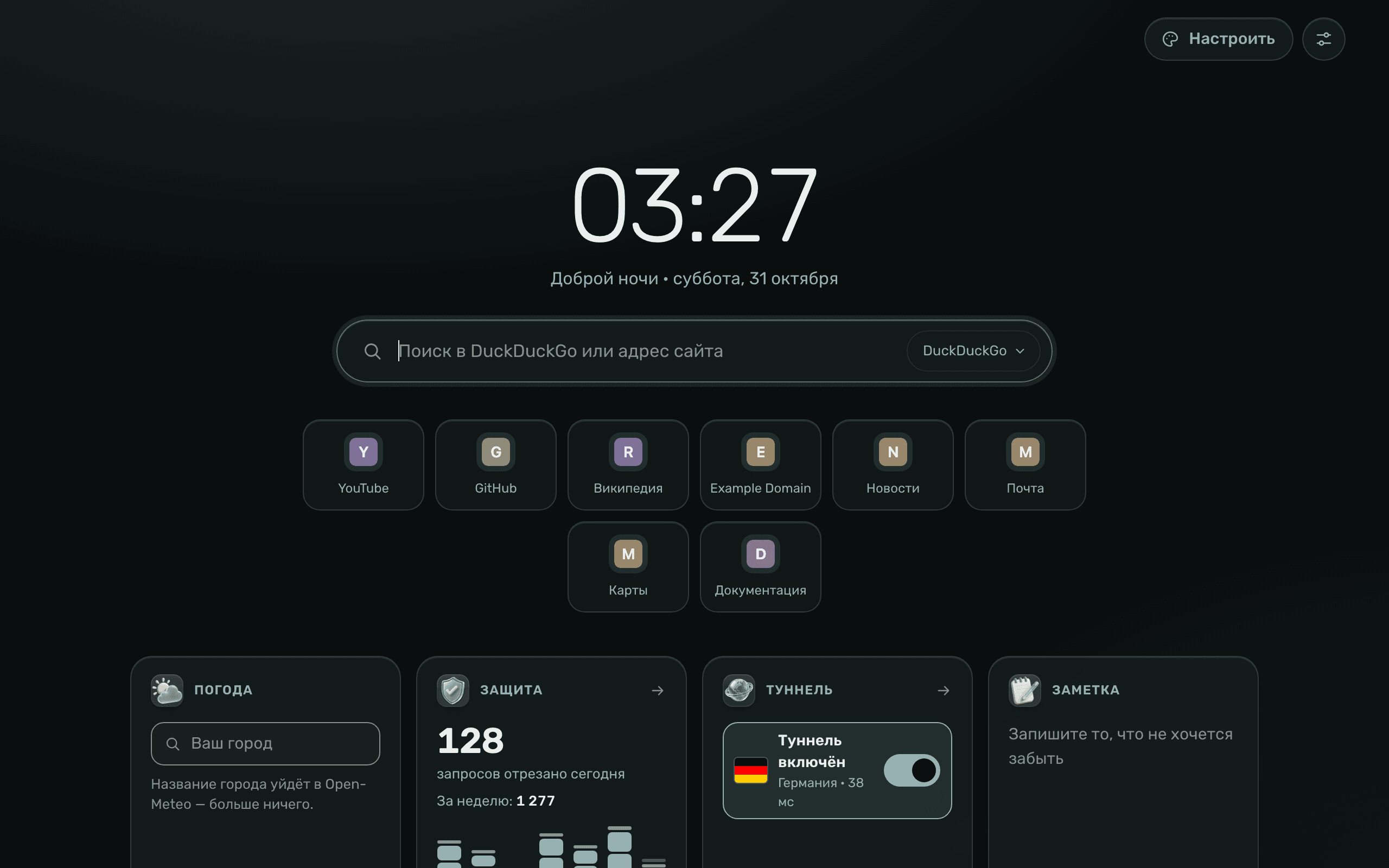
Proxys Browser new tab: clock, search, your sites, weather, protection counter and tunnel switch
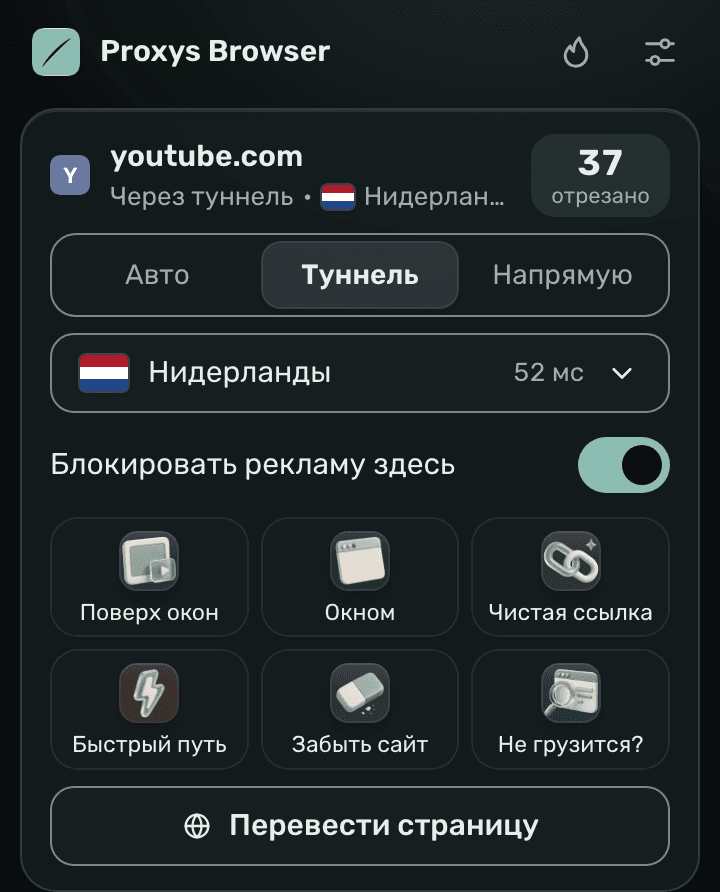
Proxys icon window: youtube.com opens through the tunnel in the Netherlands, 37 requests blocked, modes “Auto”, “Tunnel” and “Direct”

ProxysVPN built in

No need to turn a VPN on anymore

The browser opens blocked sites through ProxysVPN on its own. Banks, Gosuslugi (Russia’s government services portal) and everything else go direct, as usual.

Your choice for every site
Click the Proxys icon to the right of the address bar: “Auto” (“Авто”), “Tunnel” (“Туннель”) or “Direct” (“Напрямую”). The country and latency are there too.
“Won’t load?”
If a site doesn’t open, the browser works out why and, where it can, restores access.

SiteHow it opens

  • youtube.comProxysVPN · Netherlands
  • gosuslugi.ruDirect
  • instagram.comProxysVPN · Netherlands
  • ozon.ruDirect
  • x.comProxysVPN · Netherlands
  • sberbank.ruDirect

No ads, no trackers

Ads don’t have time to load

The browser cuts off ads and trackers before the page even calls for them. What’s left is what you came for.

What arrives with the article

You opened a news story. While the text loads, the page has time to call an ad network, a visitor counter and a social media pixel. Each sets its own cookie and remembers what you read.

Next come a banner above the headline, a pop-up asking you to subscribe and one more tracker that takes your browser’s fingerprint: screen, fonts, time zone. That is how you are recognised even without cookies.

Then this data goes to partners, and on the next site you meet the same ad. This is called retargeting, or in plain words, surveillance.

Proxys Browser cuts off ads and trackers before the page even loads. What’s left is what you came for: text, photos and video.

Instant, no sign-in
Blocking works from the first launch. No account is needed.
Third-party cookies blocked
Other sites can’t set their own cookie and use it to recognise you on a different site.
Blurred fingerprint
Screen size, fonts and other browser traits make you harder to recognise.

Privacy

Personal stays personal

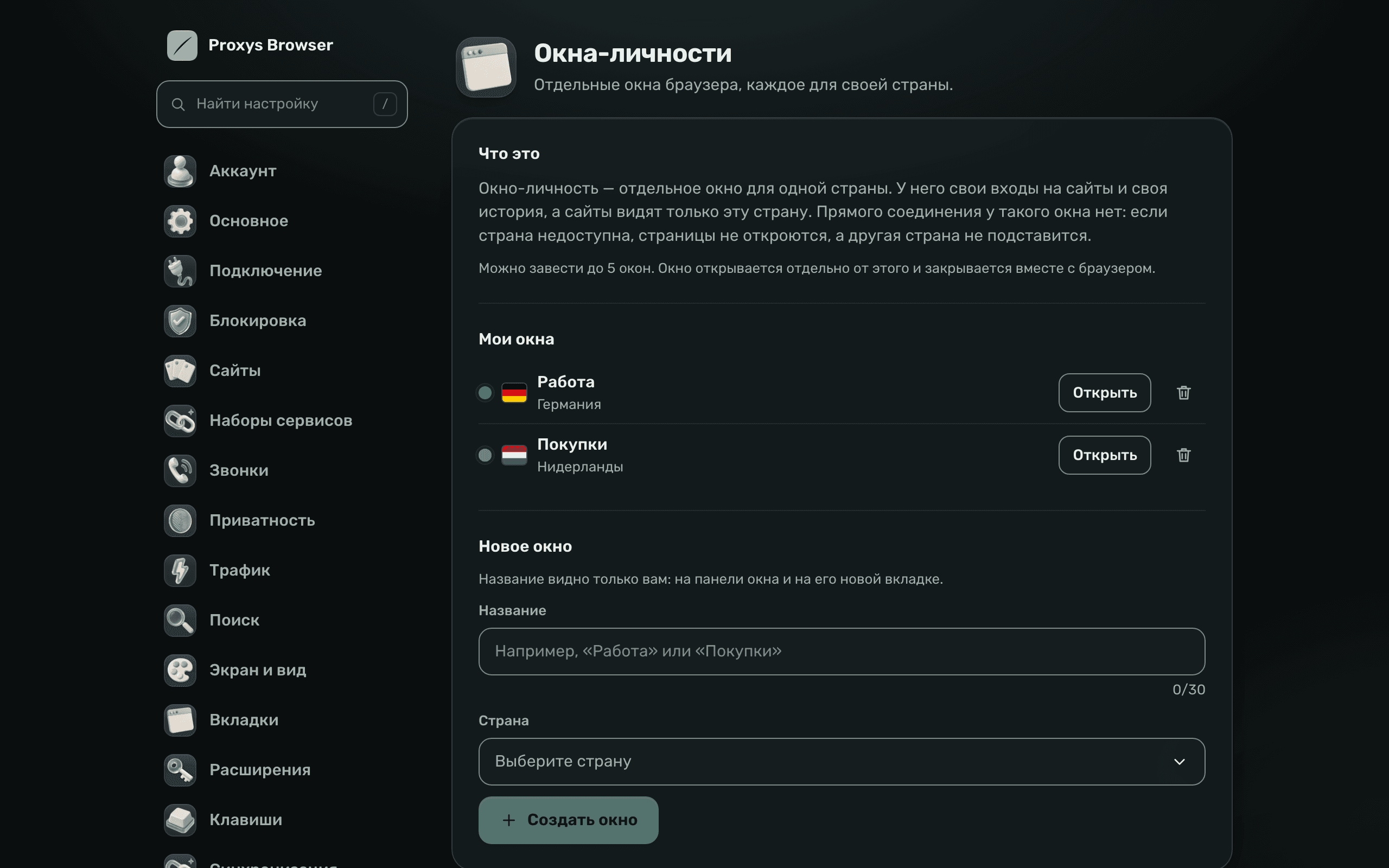
Identity windows

A separate window for work, shopping or a second account. Each has its own sign-ins and history, and the sites in it always see one chosen country.

Browser settings: identity windows “Work” in Germany and “Shopping” in the Netherlands

Secret profile

A separate profile locked with a PIN. Without the PIN it can’t be opened, and nobody can see what’s inside.

“Burn”

One button erases your history and site data.

Fake-site protection

The browser warns you before it opens a known fraudulent site.

For life in Russia

Banks, Gosuslugi and e-signatures

Everything you use every day works with ProxysVPN on.

Banks and government sites without errors

Sber, VTB, T-Bank and government sites with a Russian certificate open as they should. Switch it on once: Settings → “Connection” (“Подключение”). It applies only to .ru, .su and .рф addresses.

Electronic signature

CryptoPro, the Gosuslugi plugin and Rutoken are installed from the “Extensions” (“Расширения”) section.

Calls without lag

Call sites can be opened directly, so your voice doesn’t lag behind.

Every day

And plenty more that’s handy

  • Translation on your computer

    Pages are translated right on your computer, and the text goes nowhere. The languages download once, about 47 MB.

  • Video above your windows

    Press Alt+Shift+P and the video floats above all your windows while you work on something else.

  • Moving from another browser

    Bookmarks and passwords move over in the “General” (“Основное”) section.

  • Sleeping tabs

    Old tabs go to sleep and give their memory back. You can see how much traffic each site used.

  • Sign-in without a password

    The code arrives in the ProxysVPN bot on Telegram. It’s the same account as in the bot and the app.

  • Updates itself

    A new version downloads in the background and installs with the “Update now” (“Обновить сейчас”) button. Your tabs stay in place.

Install

Download Proxys Browser

For Windows 10 and 11, and for Macs with an M1 chip or later.

Proxys Browser for Windows

Version 0.1.8 · all files on GitHub

Most people need the standard one. ARM is for laptops with Snapdragon processors.

  1. Download the installer

    If Edge holds the file back: the arrow to the right of “Delete” → “Keep anyway”.

  2. Run it

    The installer isn’t code-signed yet, so Windows shows a blue SmartScreen window: “More info” → “Run anyway”.

  3. Sign in with a code

    The code arrives in the ProxysVPN bot. Ads are blocked even without signing in, so you can do it later.

Linux is in the works. Your sign-in code is in the ProxysVPN bot. Need help? Contact support.

Questions

The short answers

Do I need a ProxysVPN account?

For blocked sites, yes: they open through your ProxysVPN account, the same one as in the bot and the app. You sign in with a code from the bot, no password. Ads and trackers are blocked even without signing in.

Which file should I download: standard or ARM?

Most people need the standard one. The ARM version is for laptops with Snapdragon processors. The button on the site suggests the right one on its own.

Why does Windows show a warning during installation?

The installer doesn’t have a paid code signature yet, and SmartScreen doesn’t know the new program. Click “More info” → “Run anyway”. The file is downloaded straight from our repository on GitHub.

Will banks and Gosuslugi work?

Yes. Russian sites open directly, without the tunnel. For sites with a Russian certificate, turn on “Russian certificates for banks and government sites” (“Российские сертификаты для банков и госсайтов”) in “Connection” (“Подключение”). Extensions for e-signature (CryptoPro, the Gosuslugi plugin, Rutoken) are installed from “Extensions” (“Расширения”).

How is it different from Chrome?

Sites open the same way as in Chrome: it’s the same Chromium engine inside, but without Google services. On top come ProxysVPN, ad and tracker blocking, identity windows and a secret profile.

Can I move my bookmarks and passwords?

Yes: “General” (“Основное”) → “Move bookmarks and passwords” (“Перенести закладки и пароли”).

How does it update?

On its own. A new version downloads in the background, and “Update now” (“Обновить сейчас”) appears in the icon menu. The browser closes, installs the update and reopens a few seconds later with all your tabs.

Is the browser in English?

The browser’s menus and system windows follow your computer’s language. The Proxys screens (the new tab, the Proxys icon window and the settings) are in Russian for now.

Is there a version for Mac and Linux?

For Mac, yes: you need a Mac with an M1 chip or later and macOS 13 or later. A Linux version is in the works.

Opens what’s blocked. Cuts the clutter.

Version 0.1.8 · Windows 10 and 11 · 155 MB